
Hostel management software, from room allocation to deposit refund.
Every block, room and bed in one place. Wardens allocate rooms, track residents and fees, and close the year with deposit refunds, inside the same system the rest of the college uses.
 NCE Connect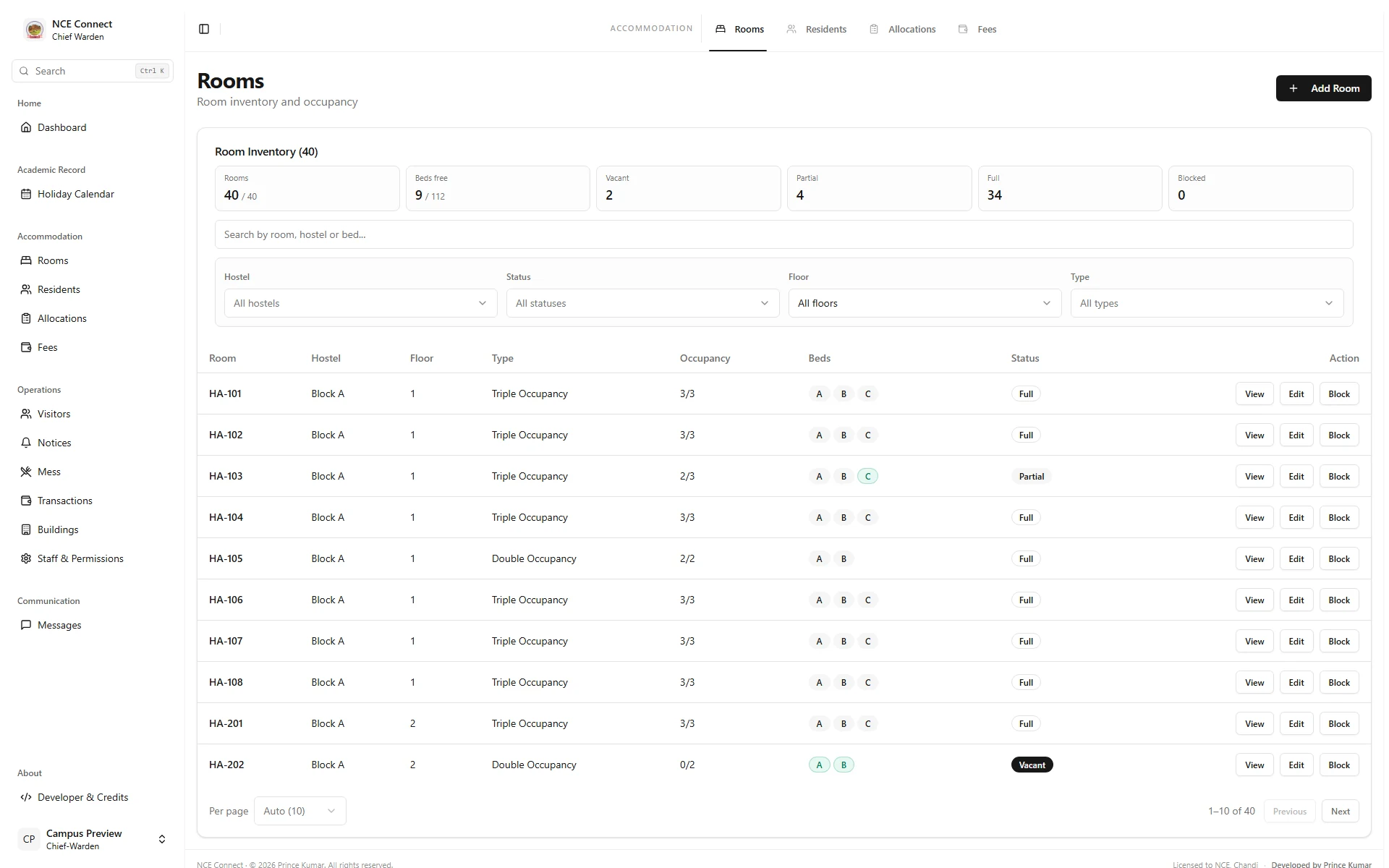
Why college hostels outgrow registers.
A hostel register works until the college grows. Then vacant beds go unnoticed, two students are promised the same room, fee dues are tracked in a separate notebook, and deposit refunds at the end of the year take weeks of checking.
Hostel management software keeps rooms, residents and money in one place. Because the hostel module is part of the college ERP, every resident is already a student in the system: there is no second list to keep in step with admissions.
Built for wardens and the hostel office.
Everything the chief warden needs, from the first allocation to the last refund.
Blocks, rooms and beds
A complete inventory of every hostel block, room and bed, with occupancy at a glance.
Room allocation
Allocate rooms and see at a glance which beds are free.
Residents
See who lives where, linked to each student’s college record.
Hostel fees
Track hostel fees for every resident.
Deposit refunds
Close each stay with a clear record of the deposit refund.
Warden access
The chief warden and hostel staff see what their role needs, and nothing more.
Reports and exports
Occupancy and fee records as PDF, Excel or CSV.
Notices
Announcements reach residents as they happen.
Part of the ERP
Shares students, roles and sign-in with the rest of the college.
The hostel module in NCE Connect.
At Nalanda College of Engineering, Chandi, the hostel runs inside NCE Connect. The chief warden manages blocks, rooms and beds, residents and fees from a dedicated workspace, alongside the dashboards used by the principal, departments, the library and students.
Read the NCE Connect case studyScreens are captured from the actual NCE Connect frontend with fictional preview records. No real student, staff or institutional data is shown.
Hostel software questions, answered.
Something else on your mind? Write to [email protected] and we will get back to you.
Can we use the hostel module without a full ERP?
Yes. Many institutions start with the office that needs help most. The hostel module can launch on its own and connect to student records, attendance or other modules later.
Does it handle several hostels and blocks?
Yes. Rooms and beds are organised by block, so separate hostels and buildings each have their own inventory and occupancy.
Can it track hostel fees and refunds?
Yes. Hostel fees and deposit refunds are recorded for each resident, so the hostel office has one place to check before a student leaves.
Can it be built around our hostel rules?
Yes. Allocation rules, fee structures, approvals and reports are shaped around how your hostel office works today.
Related.
More of what Glass Lattice builds for institutions.
Want calmer hostel admissions?
Tell us how many blocks, rooms and residents you manage. We will reply with next steps.